> ## Documentation Index
> Fetch the complete documentation index at: https://docs.percify.io/llms.txt
> Use this file to discover all available pages before exploring further.
# Create your AI twin with Clone Yourself
> Clone Yourself turns a photo of you and your voice into a talking video of you. Upload a photo or use your camera, add audio, and generate.
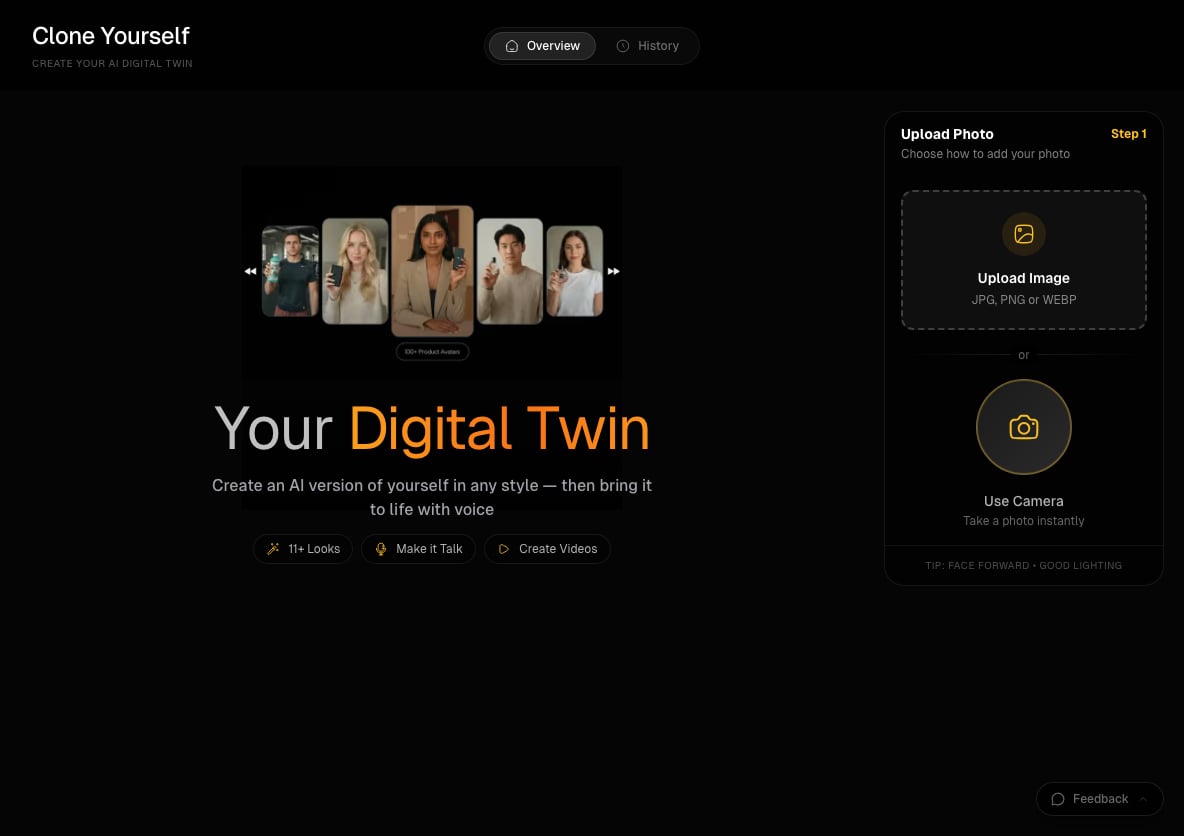
Clone Yourself makes a talking video of you from one photo. Upload a photo or take one with your camera, then record your voice (or pick audio you saved, such as a clip in your cloned voice), and Percify animates your face and lip-syncs it to the audio. It costs 2 credits per second of audio on Fast.
## What you need
* A computer. Clone Yourself runs in the desktop web app at [app.percify.io/home/cloneYourself](https://app.percify.io/home/cloneYourself), under **Clone Yourself** in the sidebar.
* A clear, front-facing photo of yourself in good light (JPG, PNG or WEBP), or a webcam.
* Your voice: a recording made on the spot (5 to 60 seconds), an uploaded audio file under 10 MB, or a clip saved in **My Voices**.
* Credits for the length of the audio (see below).
## How to create your AI twin
Open **Clone Yourself**. In the **Upload Photo** panel (Step 1), click **Upload Image**, or click **Use Camera** to take one. With the camera, choose the frame (1:1, 9:16 or 16:9) before you capture. Check the preview, then click **Continue**, or **Retake** to try again.
On **Create Talking Avatar**, open **Record** and tap to record yourself, or click **Upload Audio**. To use a script you did not record, first [generate it in your cloned voice](/percify/voice-cloning), then pick that clip under **My Voices**.
Pick **Fast** (quicker, cheaper, 480p) or **High** (sharper, slower). High also offers **720p** under **Quality**.
Check **Estimated cost**, click **Generate video**, and **Download** the result when it is ready. You can leave the page while it renders. Your videos are listed on the **History** tab of Clone Yourself.
 ## How much does it cost?
You pay per second of audio, measured on the server and rounded up to a whole second.
| Mode | Quality | Credits per second | 15 second video |
| ---- | ------- | ------------------ | --------------- |
| Fast | 480p | 2 | 30 |
| High | 480p | 4 | 60 |
| High | 720p | 6 | 90 |
Generating speech in your cloned voice in Voice Studio is a separate charge of 5 credits per clip. See [how credits work](/percify/credits), and [refunds](/billing/refunds) if a video fails.
## Limits
| Limit | Value |
| -------------- | -------------------------- |
| Photo formats | JPG, PNG or WEBP |
| Camera frame | 1:1, 9:16 or 16:9 |
| Recording | 5 to 60 seconds |
| Uploaded audio | Under 10 MB |
| Output | 480p, or 720p in High mode |
## Tips
* Face the camera straight on, with even light and nothing covering your mouth.
* Keep the first take short. A 10 second clip on Fast costs 20 credits and shows you how the photo animates.
* If the button says **Reading audio…**, the audio length is still loading. Wait a moment.
* Silent recordings are refused before any charge. If that happens, check the browser's microphone permission and input device.
It lip-syncs your face to the audio you give it. If you record yourself, the video uses that recording. To make your twin say text you type, create the speech in [Voice Studio](/percify/voice-cloning) first and select it under My Voices.
Use photos you have the right to use. The same generator also works with the ready-made faces in the [avatar library](/percify/avatar-studio).
## Related
Generate speech in your voice from a short sample.
Start from a library avatar instead of your own photo.
Audio options, modes and pricing in detail.
Fixes for photos and audio that will not upload.
## How much does it cost?
You pay per second of audio, measured on the server and rounded up to a whole second.
| Mode | Quality | Credits per second | 15 second video |
| ---- | ------- | ------------------ | --------------- |
| Fast | 480p | 2 | 30 |
| High | 480p | 4 | 60 |
| High | 720p | 6 | 90 |
Generating speech in your cloned voice in Voice Studio is a separate charge of 5 credits per clip. See [how credits work](/percify/credits), and [refunds](/billing/refunds) if a video fails.
## Limits
| Limit | Value |
| -------------- | -------------------------- |
| Photo formats | JPG, PNG or WEBP |
| Camera frame | 1:1, 9:16 or 16:9 |
| Recording | 5 to 60 seconds |
| Uploaded audio | Under 10 MB |
| Output | 480p, or 720p in High mode |
## Tips
* Face the camera straight on, with even light and nothing covering your mouth.
* Keep the first take short. A 10 second clip on Fast costs 20 credits and shows you how the photo animates.
* If the button says **Reading audio…**, the audio length is still loading. Wait a moment.
* Silent recordings are refused before any charge. If that happens, check the browser's microphone permission and input device.
It lip-syncs your face to the audio you give it. If you record yourself, the video uses that recording. To make your twin say text you type, create the speech in [Voice Studio](/percify/voice-cloning) first and select it under My Voices.
Use photos you have the right to use. The same generator also works with the ready-made faces in the [avatar library](/percify/avatar-studio).
## Related
Generate speech in your voice from a short sample.
Start from a library avatar instead of your own photo.
Audio options, modes and pricing in detail.
Fixes for photos and audio that will not upload.